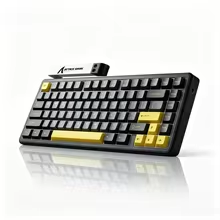
Best Gaming Keyboards for US Setups: 6 Picks Worth Comparing
Six keyboards from the current US Lichnoon catalog, selected for different priorities instead of forcing one board to fit every setup.
This article is ranked for the United States storefront. The Canada version uses a different Amazon catalog and can rank different products.
Quick answer
Start with the AULA F75 Pro if you want a compact wireless all-rounder. Choose the AULA F99 when you need more keys, or look at the Hall Effect picks when rapid-trigger gaming matters more than wireless convenience.
The best keyboard is the one that matches how you actually play and work. A competitive player may care about rapid trigger and a compact footprint, while a mixed gaming-and-productivity setup benefits more from wireless flexibility and extra keys.
This US guide uses products already available in Lichnoon's United States catalog. Amazon US picks are ranked separately from the shared AliExpress options, so the recommendations reflect what US visitors can actually open from this storefront.
How we selected these picks
We prioritized layout usefulness, connection options, switch flexibility and gaming-focused features. We do not rank a product higher simply because it has more specifications on the listing.
#1
Best overallAmazon
AULA F75 Pro Wireless Mechanical Gaming Keyboard
Best for: Most gaming setups
The 75% layout keeps the desk compact without giving up the function row, while tri-mode wireless, hot-swap support and PBT keycaps make it an easy all-round recommendation.
A compact 75% wireless mechanical keyboard with tri-mode connectivity, hot-swappable switches, RGB lighting, PBT keycaps, and a multifunction knob.
Tradeoff: A 75% board is less convenient if you use a number pad constantly.
This is the pick for someone who wants a 75% keyboard with extra visual and control features such as a TFT-LCD screen, knob, gasket mount and tri-mode connectivity.
A compact 75% tri-mode mechanical keyboard with customizable TFT-LCD display, multifunction knob, hot-swappable switches, gasket mount, RGB lighting, and a 4000mAh battery.
Tradeoff: The extra screen and controls add complexity that a minimalist buyer may not need.
The compact 96% layout is a better fit when you still want a near-full keyboard for spreadsheets, shortcuts and everyday work without returning to a large traditional footprint.
A compact 96% tri-mode mechanical keyboard with hot-swappable switches, RGB lighting, gasket structure, PBT keycaps, and an 8000mAh battery.
Tradeoff: It takes more desk space than the 65% and 75% alternatives in this guide.
Hall Effect switches, rapid trigger and an 8KHz polling specification make this the performance-focused alternative for buyers who care more about input tuning than wireless features.
A compact gaming mechanical keyboard with Hall Effect switches, 8KHz polling, 0.01mm rapid trigger, 0.125ms low latency, hot-swap support, and RGB backlighting.
Tradeoff: Its compact layout is less comfortable for users who rely on dedicated navigation or function keys.
Best for: Performance without an ultra-small layout
The HE80 combines Hall Effect switches with a practical 75% format, gasket construction and PBT keycaps, making it a balanced step toward magnetic-switch gaming.
A compact 75% wired Hall Effect magnetic keyboard with 82 keys, hot-swappable Epo MagneX switches, gasket mount construction, multicolor backlighting and durable double-shot PBT keycaps for PC and Mac.
Tradeoff: It is a wired-first choice, so it is not the best match for a cable-free setup.
AJAZZ AK820 Pro Wireless Mechanical Gaming Keyboard
Best for: Wireless mechanical keyboard shoppers
The AK820 family gives buyers another compact tri-mode option with hot-swap support, gasket construction and PBT keycaps when the Amazon picks are not the right fit.
A compact wireless mechanical gaming keyboard with Bluetooth 5.1, 2.4GHz wireless and USB-C wired connectivity, hot-swappable switches, gasket mount construction, RGB backlighting and durable PBT keycaps. Note: This listing includes AK820 and AK820 Pro variants, so some features may vary depending on the selected model.
Tradeoff: The AliExpress listing includes multiple AK820 variants, so buyers should confirm the selected version before ordering.
A 65% board saves the most space, 75% keeps the function row, and a 96% layout is easier for productivity. Layout affects every session, so solve that choice first.
Hall Effect is useful when you will tune it
Magnetic switches can provide adjustable actuation and rapid-trigger behavior, but a normal mechanical board remains a strong choice if you value wireless use, typing feel or simplicity more.
Check the exact marketplace variant
Color, switch type and included accessories can change between variants. Confirm the selected version on Amazon or AliExpress before completing the purchase.
Final verdict
For most US buyers, the AULA F75 Pro is the simplest place to start. Move to the AULA F99 for work-heavy setups, or choose one of the Hall Effect models when competitive input tuning is the reason you are upgrading.
 #1
#1